 oppi.li
1I cobbled together a journaling system with {neo,}vim,
2coreutils and [dateutils](http://www.fresse.org/dateutils).
3This system is loosely based on [Ryder
4Caroll's](https://www.rydercarroll.com/) Bullet Journal
5method.
6
7[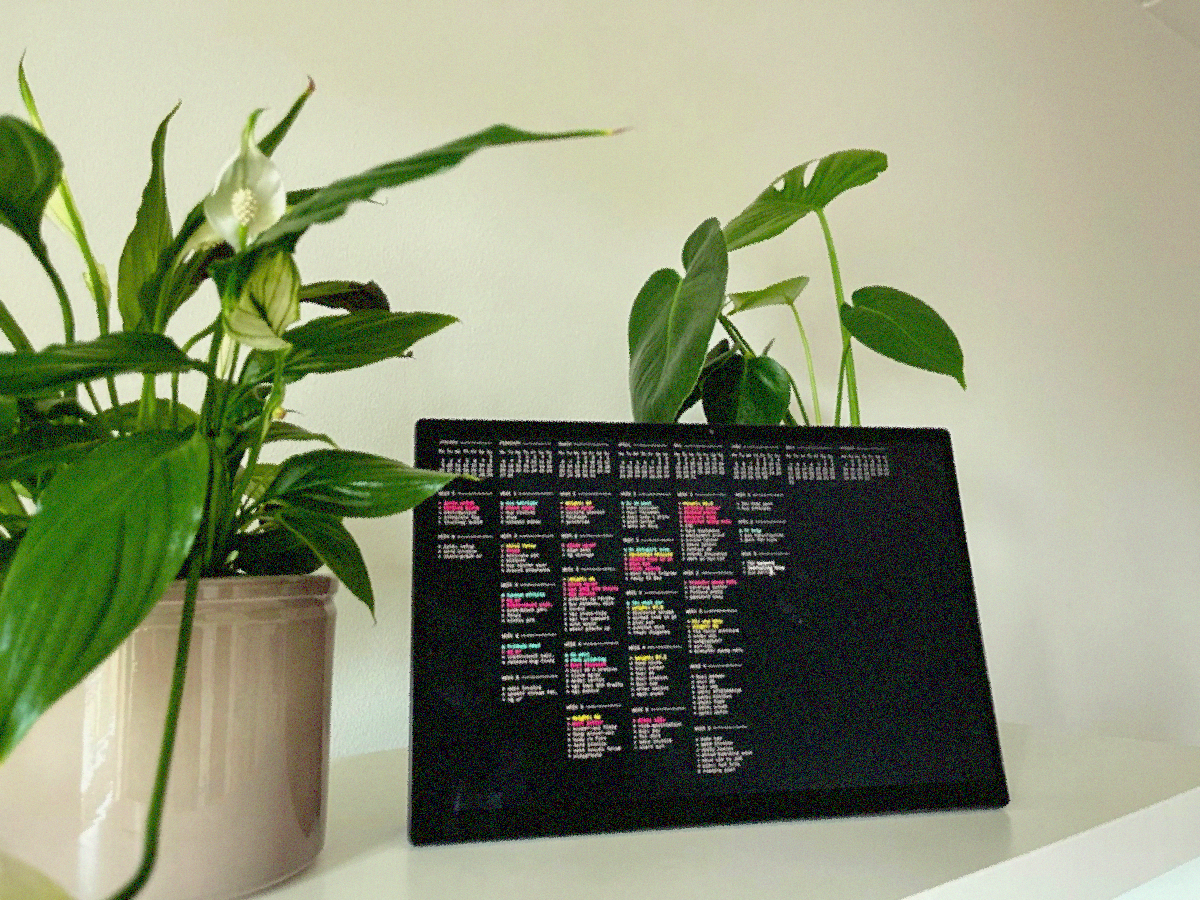](https://u.peppe.rs/SpF.png)
8
9### The format
10
11The journal for a given year is a directory:
12
13```bash
14λ ls journal/
152022/ 2023/
16```
17
18In each directory are 12 files, one for each month of the
19year, numbered like so:
20
21```bash
22λ ls journal/2023/
2301 02 03 04 05 06 07 08 09 10 11 12
24```
25
26We can now begin writing stuff down:
27
28```bash
29λ vim journal/2023/1
30```
31
32Every month must start with a calendar of course, fill that
33in with:
34
35```vim
36:read !cal -m
37```
38
39Your entry for January might look like this:
40
41```bash
42λ cat journal/2023/01
43 January 2023
44Mo Tu We Th Fr Sa Su
45 1
46 2 3 4 5 6 7 8
47 9 10 11 12 13 14 15
4816 17 18 19 20 21 22
4923 24 25 26 27 28 29
5030 31
51```
52
53I prefer planning week by week, as opposed to creating a
54task-list every day, here's what I have for the first couple
55of weeks:
56
57```
58 January 2023
59Mo Tu We Th Fr Sa Su
60 1
61 2 3 4 5 6 7 8
62 9 10 11 12 13 14 15
6316 17 18 19 20 21 22
6423 24 25 26 27 28 29
6530 31
66
67
68week 1
69
70done apply leaves
71done dload boarding pass
72moved reply to dan
73
74
75week 2
76
77todo reply to dan
78todo pack bags
79done travel insurance
80todo weigh luggage
81```
82
83I start the week by writing a header and each item that week
84is placed on its own line. The items are prefixed with a
85`todo` or a `done` signifier.
86
87
88### Form over function
89
90Right off the bat, the signifiers look very noisy, Even more
91so once we start introducing variety (I use "event", "note"
92and "moved"):
93
94```
95week 1
96
97todo apply leaves
98done dload boarding pass
99todo reply to dan
100event fr trip
101note weight 68.6
102```
103
104We can clean this up with "abbreviations" (`:h abbreviations`):
105
106```vim
107:iabbrev todo ·
108:iabbrev done ×
109```
110
111Now, typing this:
112
113```
114todo apply leaves
115```
116
117Automatically inserts:
118
119```
120· apply leaves
121```
122
123You can use `x` and `o` as well, but `×` (U+00D7,
124MULTIPLICATION SIGN) and `·` (U+00B7, MIDDLE DOT) are more
125... *gourmet*.
126
127The other signifiers I use are:
128
129- `-` for note
130- `o` for event
131- `>` for moved.
132
133Nit #2 is the lack of order. We can employ vim to introduce
134grouping and sorting. Select the list of entries for this
135week:
136
137```vim
138vip " line-wise select inner paragraph
139:'<,'>sort " the markers '< and '> are automatically inserted,
140 " they mark the start and end of the selection
141```
142
143We end up with:
144
145```
146week 1
147
148· apply leaves
149· reply to dan
150× dload boarding pass
151```
152
153The lines are grouped by their signifiers, segregating todo
154items from completed items. Luckily, MIDDLE DOT is lesser
155than MULTIPLICATION SIGN, so todo items are placed at the
156top. The same goes for `o` and `x` symbols, either set of
157signifiers will result in the same sorting order.
158
159We can shorten this select-paragraph-invoke-sort dance by
160setting the `formatprg` variable:
161
162```vim
163:set formatprg=sort\ -V
164```
165
166Now, hitting `gqip` should automatically group and sort the
167items for the week under the cursor, moving todo items to
168the top. Finding signifier glyphs that suit your sorting
169preference is a fun exercise.
170
171### Syntax highlighting
172
173Adding color to items introduces another layer of visual
174distinction. In truth, I like to deck it out just because.
175
176First, create a few syntax groups:
177
178```vim
179:syntax match JournalAll /.*/ " captures the entire buffer
180:syntax match JournalDone /^×.*/ " lines containing 'done' items: ×
181:syntax match JournalTodo /^·.*/ " lines containing 'todo' items: ·
182:syntax match JournalEvent /^o.*/ " lines containing 'event' items: o
183:syntax match JournalNote /^- .*/ " lines containing 'note' items: -
184:syntax match JournalMoved /^>.*/ " lines containing 'moved' items: >
185```
186
187Add highlights to each group:
188
189```vim
190:highlight JournalAll ctermfg=12 " bright black
191:highlight JournalDone ctermfg=12 " bright black
192:highlight JournalEvent ctermfg=6 " cyan
193:highlight JournalMoved ctermfg=5 " magenta
194:highlight JournalNote ctermfg=3 " yellow
195```
196
197In my terminal, this is rendered like so:
198
199[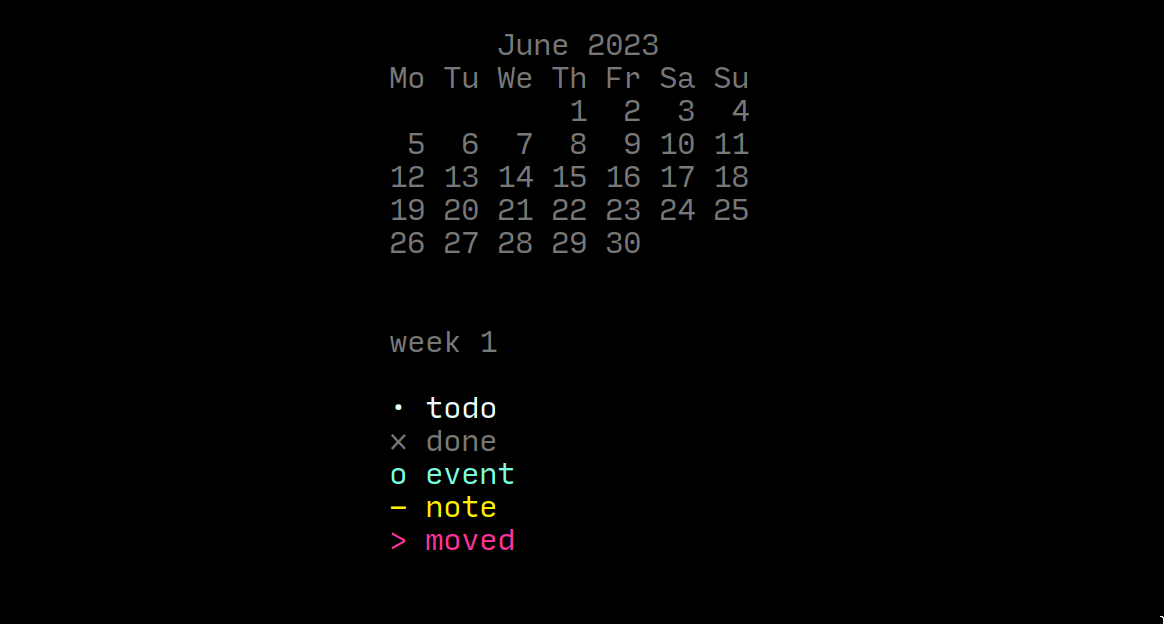](https://u.peppe.rs/Du6.png)
200
201### Habit tracking
202
203While this is not a part of my journaling system anymore, a
204few headers and an awk script is all it takes to track
205habits. My weekly entries would include a couple of habit
206headers like so:
207
208```
209week 1 --------------
210
211× wake up on time
212× water the plants
213
214spend 7.5 7 10
215---------------------
216
217
218week 2 --------------
219
220· make the bed
221· go to bed
222
223spend 30 2.75 6
224---------------------
225```
226
227Here, under the `spend` header in week 1, are a list of
228expenditures accumulated over the week. The monthly spend is
229calculated with this awk script:
230
231```awk
232BEGIN {spend=0;}
233/spend/ {for(i=1;i<=$NF;i++) spend+=$i;}
234END { printf spend "eur"}
235```
236
237And invoked like so:
238
239```
240λ awk -f spend.awk journal/2023/01
24163.25eur
242```
243
244### Reflection
245
246Journaling is not just about planning what is to come, but
247also reflecting on what has passed. It would make sense to
248simultaneously look at the past few weeks' entries while
249making your current one. To open multiple months of entries
250at the same time:
251
252```
253λ vim -O journal/2023/0{1,2,3}
254```
255
256Opens 3 months, side-by-side, in vertical splits:
257
258```
259JANUARY ------------ │ FEBRUARY ----------- │ MARCH --------------
260 │ │
261Mo Tu We Th Fr Sa Su │ Mo Tu We Th Fr Sa Su │ Mo Tu We Th Fr Sa Su
262 1 │ 1 2 3 4 5 │ 1 2 3 4 5
263 2 3 4 5 6 7 8 │ 6 7 8 9 10 11 12 │ 6 7 8 9 10 11 12
264 9 10 11 12 13 14 15 │ 13 14 15 16 17 18 19 │ 13 14 15 16 17 18 19
26516 17 18 19 20 21 22 │ 20 21 22 23 24 25 26 │ 20 21 22 23 24 25 26
26623 24 25 26 27 28 29 │ 27 28 │ 27 28 29 30 31
26730 31 │ │
268 │ │
269 │ │
270WEEK 1 ------------- │ WEEK 1 ------------- │ WEEK 1 -------------
271 │ │
272> latex setup │ > forex │ - weight: 64
273× make the bed │ × clean shoes │ > close sg-pr
274× 03: dentist │ × buy clothes │ × facewash
275× integrate tsg │ × draw │ × groceries
276 │ │
277 │ │
278WEEK 2 ------------- │ WEEK 2 ------------- │ WEEK 2 -------------
279 │ │
280× latex setup │ - viral fever │ > close sg-pr
281× send invoice │ × forex │ × plan meet
282× stack-graph pr │ × activate sim │ × sg storage
283 │ × bitlbee │
284```
285
286### Reducing friction
287
288Journaling already requires a solid amount of discipline and
289consistency. The added friction of typing `vim
290journal/$CURRENT_YEAR/$CURRENT_MONTH` each time is doing no
291favors.
292
293To open the current month based on system time:
294
295```bash
296λ vim $(date +"%Y/%m")
297```
298
299To open all the months within a 2 month window of today, is
300a little trickier. The command we wish to generate is (if
301today is 2023/12):
302
303```bash
304λ vim -O 2023/10 2023/11 2023/12 2024/01 2024/02
305```
306
307And that is where `dateseq` from
308[dateutils](http://www.fresse.org/dateutils) comes in handy,
309for example:
310
311```bash
312λ dateseq 2012-02-01 2012-03-01
3132012-02-01
3142012-02-02
3152012-02-03
316...
3172012-02-28
3182012-02-29
3192012-03-01
320```
321
322This script opens all months within a 2 month window of
323today:
324
325```bash
326λ vim -O $(
327 dateseq \
328 "$(date --date "2 months ago" +%Y/%m)" \
329 "$(date --date "2 months" +%Y/%m)" \
330 -i %Y/%m \
331 -f %Y/%m
332)
333```
334
335
336### Fin
337
338You can find a sample vimrc in this repository,
339along with a nix flake file to kick things off:
340
341```
342λ nix develop
343λ cd examples
344λ journal
345```
346
347Plain text journaling can be just as much fun as a pen and
348paper. Throw in some ASCII art for each month, use swankier
349signifiers, or louder syntax highlighting. Don't expect
350forgiveness from org-mode users though.
351
352[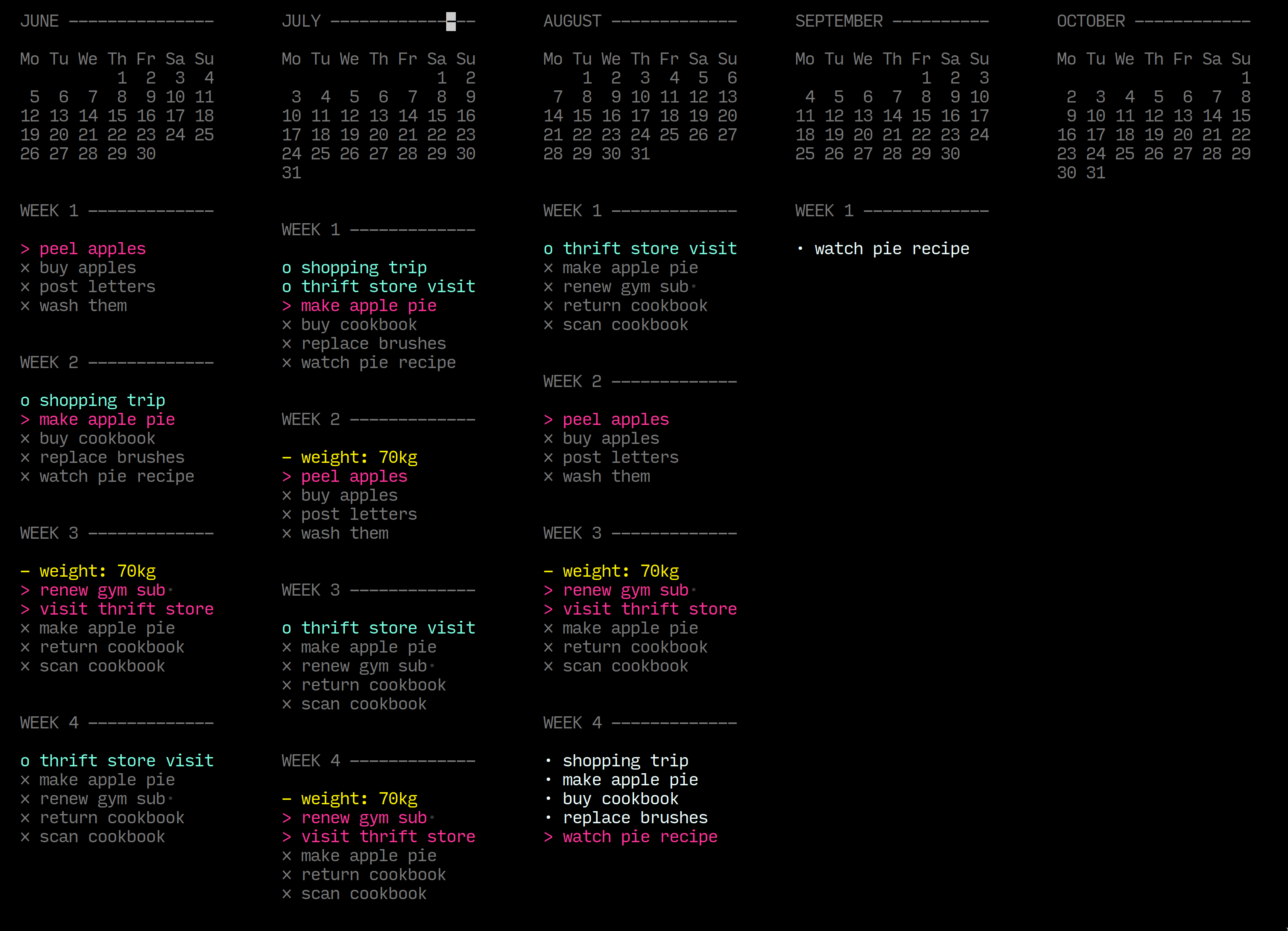](https://u.peppe.rs/ZCK.png)
353