 openstatus.dev
Openstatus
www.openstatus.dev
1<p align="center" style="margin-top: 120px">
2
3 <h3 align="center">OpenStatus</h3>
4
5 <p align="center">
6 <a href="https://status.openstatus.dev">
7 <img src='https://status.openstatus.dev/badge/v2?variant=outline'>
8 </a>
9 </p>
10
11 <p align="center">The Open-Source synthetic monitoring platform.
12 <br />
13 <a href="https://www.openstatus.dev"><strong>Learn more »</strong></a>
14 <br />
15 <br />
16 <a href="https://www.openstatus.dev/discord">Discord</a>
17 ·
18 <a href="https://www.openstatus.dev">Website</a>
19 ·
20 <a href="https://github.com/openstatushq/openstatus/issues">Issues</a>
21 </p>
22</p>
23
24## About OpenStatus 🏓
25
26OpenStatus is open-source synthetic monitoring platform.
27
28- **Synthetic monitoring**: Monitor your website and APIs globally and receive
29 notifications when they are down or slow.
30
31## Recognitions 🏆
32
33<a href="https://trendshift.io/repositories/1780" target="_blank"><img src="https://trendshift.io/api/badge/repositories/1780" alt="openstatusHQ%2Fopenstatus | Trendshift" style="width: 250px; height: 55px;" width="250" height="55"/></a>
34
35<a href="https://news.ycombinator.com/item?id=37740870">
36 <img
37 alt="Featured on Hacker News"
38 src="https://hackerbadge.now.sh/api?id=37740870"
39 style="width: 250px; height: 55px;" width="250" height="55"
40 />
41</a>
42
43<a href="https://www.producthunt.com/posts/openstatus-2?utm_source=badge-top-post-badge&utm_medium=badge" target="_blank">
44 <img
45 alt="OpenStatus - #2 Product of the Day on Product Hunt"
46 src="https://api.producthunt.com/widgets/embed-image/v1/top-post-badge.svg?post_id=openstatus-2&theme=light&period=daily"
47 style="width: 250px; height: 55px;" width="250" height="55"
48 />
49</a>
50
51## Contact us 💌
52
53If you are interested in our enterprise plan or need special features, please
54email us at [ping@openstatus.dev](mailto:ping@openstatus.dev) or book a
55call<br/><br/>
56<a href="https://cal.com/team/openstatus/30min"><img alt="Book us with Cal.com" src="https://cal.com/book-with-cal-dark.svg" /></a>
57
58## Contributing 🤝
59
60If you want to help us building the best status page and alerting system, you
61can check our
62[contributing guidelines](https://github.com/openstatusHQ/openstatus/blob/main/CONTRIBUTING.MD)
63
64### Top Contributors
65
66<a href="https://github.com/openstatushq/openstatus/graphs/contributors">
67 <img src="https://contrib.rocks/image?repo=openstatushq/openstatus" />
68</a>
69
70Made with [Contrib.rocks](https://contrib.rocks)
71
72### Stats
73
74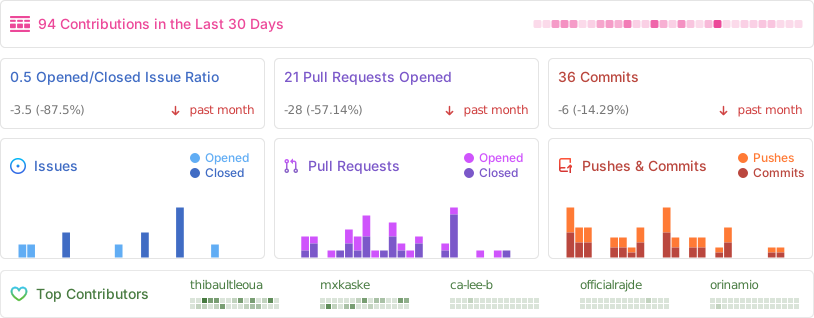
75
76## Tech stack 🥞
77
78- [Next.js](https://nextjs.org/)
79- [Tailwind CSS](https://tailwindcss.com/)
80- [shadcn/ui](https://ui.shadcn.com/)
81- [tinybird](https://tinybird.co/?ref=openstatus.dev)
82- [turso](https://turso.tech/)
83- [drizzle](https://orm.drizzle.team/)
84- [Resend](https://resend.com/)
85
86[](https://depot.dev/?utm_source=Opource=OpenStatus)
87
88## Getting Started 🚀
89
90### With Docker (Recommended)
91
92The fastest way to get started for both development and self-hosting:
93
94```sh
95# 1. Copy environment file
96cp .env.docker.example .env.docker
97
98# 2. Start all services
99docker compose up -d
100
101# 3. Access the application
102open http://localhost:3002 # Dashboard
103open http://localhost:3003 # Status Pages
104```
105
106📖 **Full guide**: [DOCKER.md](DOCKER.md)
107
108### With Devbox
109
110You can use [Devbox](https://www.jetify.com/devbox/) and get started with the following commands:
111
1121. Install Devbox
113 ```sh
114 curl -fsSL https://get.jetify.com/devbox | bash
115 ```
1162. Install project dependencies, build and start services
117 ```sh
118 devbox services up
119 ```
120
121### Manual Setup
122
123#### Requirements
124
125- [Node.js](https://nodejs.org/en/) >= 20.0.0
126- [pnpm](https://pnpm.io/) >= 8.6.2
127- [Bun](https://bun.sh/)
128- [Turso CLI](https://docs.turso.tech/quickstart)
129
130#### Setup
131
1321. Clone the repository
133
134```sh
135git clone https://github.com/openstatushq/openstatus.git
136```
137
1382. Install dependencies
139
140```sh
141pnpm install
142```
143
1443. Initialize the development environment
145
146Launch the database in one terminal:
147
148```sh
149turso dev --db-file openstatus-dev.db
150```
151
152In another terminal, run the following command:
153
154```sh
155pnpm dx
156```
157
1584. Launch whatever app you wish to:
159
160```sh
161pnpm dev:web
162pnpm dev:status-page
163pnpm dev:dashboard
164```
165
166The above commands whill automatically run the libSQL client on `8080` so you might wanna kill the turso command from step 3.
167
1685. See the results:
169
170- open [http://localhost:3000](http://localhost:3000) (default port)
171
172### Videos
173
174Videos to better understand the OpenStatus codebase:
175
176- [The code behind OpenStatus and how it uses Turbopack](https://youtube.com/watch?v=PYfSJATE8v8).
177- [Drop Betterstack and go open source](https://www.youtube.com/watch?v=PKag0USy3eQ)