Learn how to use Rust to build ATProto powered applications
 baileytownsend.dev
1# Rusty Statusphere
2
3Originally taken
4from [bluesky-social/atproto-website](https://github.com/bluesky-social/atproto-website/blob/dbcd70ced53078579c7e5b015a26db295b7a7807/src/app/%5Blocale%5D/guides/applications/en.mdx)
5
6> [!NOTE]
7> ***This tutorial is based off of the original quick start guide found [here](https://atproto.com/guides/applications).
8> The goal is to follow as closely to the original as possible, expect for one small change. It's in Rust 🦀.
9> All credit goes to the maintainers of the original project and tutorial. This was made to help you get started with
10> using Rust to write applications in the Atmosphere. Parts that stray from the tutorial, or need extra context will be in blocks like this one.***
11
12# Quick start guide to building applications on AT Protocol
13
14[Find the source code on GitHub](https://github.com/fatfingers23/rusty_statusphere_example_app)
15
16In this guide, we're going to build a simple multi-user app that publishes your current "status" as an emoji. Our
17application will look like this:
18
19
20
21We will cover how to:
22
23- Signin via OAuth
24- Fetch information about users (profiles)
25- Listen to the network firehose for new data via the [Jetstream](https://docs.bsky.app/blog/jetstream)
26- Publish data on the user's account using a custom schema
27
28We're going to keep this light so you can quickly wrap your head around ATProto. There will be links with more
29information about each step.
30
31## Introduction
32
33Data in the Atmosphere is stored on users' personal repos. It's almost like each user has their own website. Our goal is
34to aggregate data from the users into our SQLite DB.
35
36Think of our app like a Google. If Google's job was to say which emoji each website had under `/status.json`, then it
37would show something like:
38
39- `nytimes.com` is feeling 📰 according to `https://nytimes.com/status.json`
40- `bsky.app` is feeling 🦋 according to `https://bsky.app/status.json`
41- `reddit.com` is feeling 🤓 according to `https://reddit.com/status.json`
42
43The Atmosphere works the same way, except we're going to check `at://` instead of `https://`. Each user has a data repo
44under an `at://` URL. We'll crawl all the user data repos in the Atmosphere for all the "status.json" records and
45aggregate them into our SQLite database.
46
47> `at://` is the URL scheme of the AT Protocol. Under the hood it uses common tech like HTTP and DNS, but it adds all of
48> the features we'll be using in this tutorial.
49
50## Step 1. Starting with our Actix Web app
51
52Start by cloning the repo and installing packages.
53
54```bash
55git clone https://github.com/fatfingers23/rusty_statusphere_example_app.git
56cd rusty_statusphere_example_app
57cp .env.template .env
58cargo run
59# Navigate to http://127.0.0.1:8080
60```
61
62Our repo is a regular Web app. We're rendering our HTML server-side like it's 1999. We also have a SQLite database that
63we're managing with [async-sqlite](https://crates.io/crates/async-sqlite).
64
65Our starting stack:
66
67- [Rust](https://www.rust-lang.org/tools/install)
68- Rust web server ([Actix Web](https://actix.rs/))
69- SQLite database ([async-sqlite](https://crates.io/crates/async-sqlite))
70- HTML Templating ([askama](https://crates.io/crates/askama))
71
72> [!NOTE]
73> Along with the above, we are also using a couple of community maintained projects for using rust with the ATProtocol.
74> Since these are community maintained I have also linked sponsor links for the maintainers and _highly_ recommend you to
75> think
76> about sponsoring them.
77> Thanks to their work and projects, we are able to create Rust applications in the Atmosphere.
78> - ATProtocol client and OAuth
79 with [atrium](https://github.com/atrium-rs/atrium) - [sponsor sugyan](https://github.com/sponsors/sugyan)
80> - Jetstream consumer
81 with [rocketman](https://crates.io/crates/rocketman)- [buy natalie a coffee](https://ko-fi.com/uxieq)
82
83With each step we'll explain how our Web app taps into the Atmosphere. Refer to the codebase for more detailed code
84— again, this tutorial is going to keep it light and quick to digest.
85
86## Step 2. Signing in with OAuth
87
88When somebody logs into our app, they'll give us read & write access to their personal `at://` repo. We'll use that to
89write the status json record.
90
91We're going to accomplish this using OAuth ([spec](https://github.com/bluesky-social/proposals/tree/main/0004-oauth)).
92Most of the OAuth flows are going to be handled for us using
93the [atrium-oauth](https://crates.io/crates/atrium-oauth)
94crate. This is the arrangement we're aiming toward:
95
96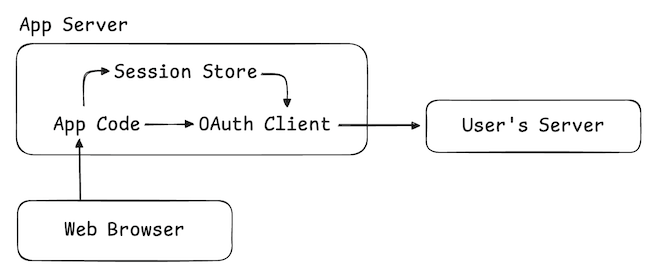
97
98When the user logs in, the OAuth client will create a new session with their repo server and give us read/write access
99along with basic user info.
100
101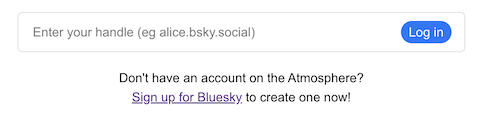
102
103Our login page just asks the user for their "handle," which is the domain name associated with their account.
104For [Bluesky](https://bsky.app) users, these tend to look like `alice.bsky.social`, but they can be any kind of domain (
105eg `alice.com`).
106
107```html
108<!-- templates/login.html -->
109<form action="/login" method="post" class="login-form">
110 <input
111 type="text"
112 name="handle"
113 placeholder="Enter your handle (eg alice.bsky.social)"
114 required
115 />
116 <button type="submit">Log in</button>
117</form>
118```
119
120When they submit the form, we tell our OAuth client to initiate the authorization flow and then redirect the user to
121their server to complete the process.
122
123```rust
124/** ./src/main.rs **/
125/// Login endpoint
126#[post("/login")]
127async fn login_post(
128 request: HttpRequest,
129 params: web::Form<LoginForm>,
130 oauth_client: web::Data<OAuthClientType>,
131) -> HttpResponse {
132 // This will act the same as the js method isValidHandle
133 match atrium_api::types::string::Handle::new(params.handle.clone()) {
134 Ok(handle) => {
135 // Initiates the OAuth flow
136 let oauth_url = oauth_client
137 .authorize(
138 &handle,
139 AuthorizeOptions {
140 scopes: vec![
141 Scope::Known(KnownScope::Atproto),
142 Scope::Known(KnownScope::TransitionGeneric),
143 ],
144 ..Default::default()
145 },
146 )
147 .await;
148 match oauth_url {
149 Ok(url) => Redirect::to(url)
150 .see_other()
151 .respond_to(&request)
152 .map_into_boxed_body(),
153 Err(err) => {
154 log::error!("Error: {err}");
155 let html = LoginTemplate {
156 title: "Log in",
157 error: Some("OAuth error"),
158 };
159 HttpResponse::Ok().body(html.render().expect("template should be valid"))
160 }
161 }
162 }
163 Err(err) => {
164 let html: LoginTemplate<'_> = LoginTemplate {
165 title: "Log in",
166 error: Some(err),
167 };
168 HttpResponse::Ok().body(html.render().expect("template should be valid"))
169 }
170 }
171}
172```
173
174This is the same kind of SSO flow that Google or GitHub uses. The user will be asked for their password, then asked to
175confirm the session with your application.
176
177When that finishes, the user will be sent back to `/oauth/callback` on our Web app. The OAuth client will store the
178access tokens for the user's server, and then we attach their account's [DID](https://atproto.com/specs/did) to the
179cookie-session.
180
181```rust
182/** ./src/main.rs **/
183/// OAuth callback endpoint to complete session creation
184#[get("/oauth/callback")]
185async fn oauth_callback(
186 request: HttpRequest,
187 params: web::Query<CallbackParams>,
188 oauth_client: web::Data<OAuthClientType>,
189 session: Session,
190) -> HttpResponse {
191 // Store the credentials
192 match oauth_client.callback(params.into_inner()).await {
193 Ok((bsky_session, _)) => {
194 let agent = Agent::new(bsky_session);
195 match agent.did().await {
196 Some(did) => {
197 //Attach the account DID to our user via a cookie
198 session.insert("did", did).unwrap();
199 Redirect::to("/")
200 .see_other()
201 .respond_to(&request)
202 .map_into_boxed_body()
203 }
204 None => {
205 let html = ErrorTemplate {
206 title: "Log in",
207 error: "The OAuth agent did not return a DID. My try relogging in.",
208 };
209 HttpResponse::Ok().body(html.render().expect("template should be valid"))
210 }
211 }
212 }
213 Err(err) => {
214 log::error!("Error: {err}");
215 let html = ErrorTemplate {
216 title: "Log in",
217 error: "OAuth error, check the logs",
218 };
219 HttpResponse::Ok().body(html.render().expect("template should be valid"))
220 }
221 }
222}
223```
224
225With that, we're in business! We now have a session with the user's repo server and can use that to access their data.
226
227## Step 3. Fetching the user's profile
228
229Why don't we learn something about our user? In [Bluesky](https://bsky.app), users publish a "profile" record which
230looks like this:
231
232```rust
233pub struct ProfileViewDetailedData {
234 pub display_name: Option<String>, // a human friendly name
235 pub description: Option<String>, // a short bio
236 pub avatar: Option<String>, // small profile picture
237 pub banner: Option<String>, // banner image to put on profiles
238 pub created_at: Option<String> // declared time this profile data was added
239 // ...
240}
241```
242
243You can examine this record directly using [atproto-browser.vercel.app](https://atproto-browser.vercel.app). For
244instance, [this is the profile record for @bsky.app](https://atproto-browser.vercel.app/at?u=at://did:plc:z72i7hdynmk6r22z27h6tvur/app.bsky.actor.profile/self).
245
246> [!NOTE]
247> In the original tutorial `agent.com.atproto.repo.getRecord` is used, which is
248> this [method](https://docs.rs/atrium-api/latest/atrium_api/com/atproto/repo/get_record/index.html) in atrium-api.
249> For simplicity we are
250> using [agent.api.app.bsky.actor.get_profile](https://docs.rs/atrium-api/latest/atrium_api/app/bsky/actor/get_profile/index.html).
251> The original text found here has been moved to [Step 4. Reading & writing records](#step-4-reading--writing-records)
252> since it makes more sense in that context.
253
254We're going to use the [Agent](https://crates.io/crates/atrium-oauth) associated with the
255user's OAuth session to fetch this record.
256
257Let's update our homepage to fetch this profile record:
258
259```rust
260/** ./src/main.rs **/
261/// Homepage
262#[get("/")]
263async fn home(
264 _req: HttpRequest,
265 session: Session,
266 oauth_client: web::Data<OAuthClientType>,
267 db_pool: web::Data<Pool>,
268 handle_resolver: web::Data<HandleResolver>,
269) -> Result<impl Responder> {
270 const TITLE: &str = "Home";
271
272 // If the user is signed in, get an agent which communicates with their server
273 match session.get::<String>("did").unwrap_or(None) {
274 Some(did) => {
275 let did = Did::new(did).expect("failed to parse did");
276 match oauth_client.restore(&did).await {
277 Ok(session) => {
278 let agent = Agent::new(session);
279
280 // Fetch additional information about the logged-in user
281 let profile = agent
282 .api
283 .app
284 .bsky
285 .actor
286 .get_profile(
287 atrium_api::app::bsky::actor::get_profile::ParametersData {
288 actor: atrium_api::types::string::AtIdentifier::Did(did),
289 }.into(),
290 )
291 .await;
292
293 // Serve the logged-in view
294 let html = HomeTemplate {
295 title: TITLE,
296 status_options: &STATUS_OPTIONS,
297 profile: match profile {
298 Ok(profile) => {
299 let profile_data = Profile {
300 did: profile.did.to_string(),
301 display_name: profile.display_name.clone(),
302 };
303 Some(profile_data)
304 }
305 Err(err) => {
306 log::error!("Error accessing profile: {err}");
307 None
308 }
309 },
310 }.render().expect("template should be valid");
311
312 Ok(web::Html::new(html))
313 }
314 Err(err) => {
315 //Unset the session
316 session.remove("did");
317 log::error!("Error restoring session: {err}");
318 let error_html = ErrorTemplate {
319 title: TITLE,
320 error: "Was an error resuming the session, please check the logs.",
321 }.render().expect("template should be valid");
322
323 Ok(web::Html::new(error_html))
324 }
325 }
326 }
327 None => {
328 // Serve the logged-out view
329 let html = HomeTemplate {
330 title: TITLE,
331 status_options: &STATUS_OPTIONS,
332 profile: None,
333 }.render().expect("template should be valid");
334
335 Ok(web::Html::new(html))
336 }
337 }
338}
339```
340
341With that data, we can give a nice personalized welcome banner for our user:
342
343
344
345```html
346<!-- templates/home.html -->
347<div class="card">
348 {% if let Some(Profile {did, display_name}) = profile %}
349 <form action="/logout" method="post" class="session-form">
350 <div>
351 Hi,
352 {% if let Some(display_name) = display_name %}
353 <strong>{{display_name}}</strong>
354 {% else %}
355 <strong>friend</strong>
356 {% endif %}.
357 What's your status today??
358 </div>
359 <div>
360 <button type="submit">Log out</button>
361 </div>
362 </form>
363 {% else %}
364 <div class="session-form">
365 <div><a href="/login">Log in</a> to set your status!</div>
366 <div>
367 <a href="/login" class="button">Log in</a>
368 </div>
369 </div>
370 {% endif %}
371</div>
372```
373
374## Step 4. Reading & writing records
375
376You can think of the user repositories as collections of JSON records:
377
378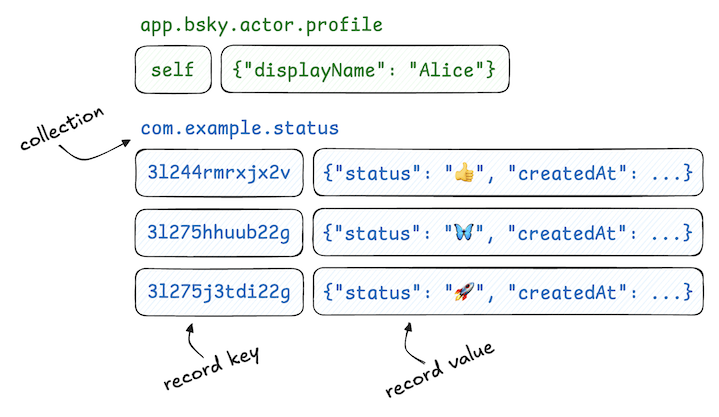
379
380When asking for a record, we provide three pieces of information.
381
382- **repo** The [DID](https://atproto.com/specs/did) which identifies the user,
383- **collection** The collection name, and
384- **rkey** The record key
385
386We'll explain the collection name shortly. Record keys are strings
387with [some restrictions](https://atproto.com/specs/record-key#record-key-syntax) and a couple of common patterns. The
388`"self"` pattern is used when a collection is expected to only contain one record which describes the user.
389
390Let's look again at how we read the "profile" record:
391
392```rust
393fn example_get_record() {
394 let get_result = agent
395 .api
396 .com
397 .atproto
398 .repo
399 .get_record(
400 atrium_api::com::atproto::repo::get_record::ParametersData {
401 cid: None,
402 collection: "app.bsky.actor.profile" // The collection
403 .parse()
404 .unwrap(),
405 repo: did.into(), // The user
406 rkey: "self".parse().unwrap(), // The record key
407 }
408 .into(),
409 )
410 .await;
411}
412
413```
414
415We write records using a similar API. Since our goal is to write "status" records, let's look at how that will happen:
416
417```rust
418fn example_create_record() {
419 let did = atrium_api::types::string::Did::new(did_string.clone()).unwrap();
420 let agent = Agent::new(session);
421
422 let status: Unknown = serde_json::from_str(
423 format!(
424 r#"{{"$type":"xyz.statusphere.status","status":"{}","createdAt":"{}"}}"#,
425 form.status,
426 Datetime::now().as_str()
427 )
428 .as_str(),
429 ).unwrap();
430
431 let create_result = agent
432 .api
433 .com
434 .atproto
435 .repo
436 .create_record(
437 atrium_api::com::atproto::repo::create_record::InputData {
438 collection: Status::NSID.parse().unwrap(), // The collection
439 repo: did.clone().into(), // The user
440 rkey: None, // The record key, auto creates with None
441 record: status, // The record from a strong type
442 swap_commit: None,
443 validate: None,
444 }
445 .into(),
446 )
447 .await;
448}
449```
450
451Our `POST /status` route is going to use this API to publish the user's status to their repo.
452
453```rust
454/// "Set status" Endpoint
455#[post("/status")]
456async fn status(
457 request: HttpRequest,
458 session: Session,
459 oauth_client: web::Data<OAuthClientType>,
460 db_pool: web::Data<Pool>,
461 form: web::Form<StatusForm>,
462) -> HttpResponse {
463 const TITLE: &str = "Home";
464
465 // If the user is signed in, get an agent which communicates with their server
466 match session.get::<String>("did").unwrap_or(None) {
467 Some(did_string) => {
468 let did = atrium_api::types::string::Did::new(did_string.clone())
469 .expect("failed to parse did");
470 match oauth_client.restore(&did).await {
471 Ok(session) => {
472 let agent = Agent::new(session);
473
474 // Construct their status record
475 let status: Unknown = serde_json::from_str(
476 format!(
477 r#"{{"$type":"xyz.statusphere.status","status":"{}","createdAt":"{}"}}"#,
478 form.status,
479 Datetime::now().as_str()
480 )
481 .as_str(),
482 ).unwrap();
483
484 // Write the status record to the user's repository
485 let create_result = agent
486 .api
487 .com
488 .atproto
489 .repo
490 .create_record(
491 atrium_api::com::atproto::repo::create_record::InputData {
492 collection: "xyz.statusphere.status".parse().unwrap(),
493 repo: did.clone().into(),
494 rkey: None,
495 record: status,
496 swap_commit: None,
497 validate: None,
498 }
499 .into(),
500 )
501 .await;
502
503 match create_result {
504 Ok(_) => Redirect::to("/")
505 .see_other()
506 .respond_to(&request)
507 .map_into_boxed_body(),
508 Err(err) => {
509 log::error!("Error creating status: {err}");
510 let error_html = ErrorTemplate {
511 title: TITLE,
512 error: "Was an error creating the status, please check the logs.",
513 }
514 .render()
515 .expect("template should be valid");
516 HttpResponse::Ok().body(error_html)
517 }
518 }
519 }
520 Err(err) => {
521 //Unset the session
522 session.remove("did");
523 log::error!(
524 "Error restoring session, we are removing the session from the cookie: {err}"
525 );
526 let error_html = ErrorTemplate {
527 title: TITLE,
528 error: "Was an error resuming the session, please check the logs.",
529 }
530 .render()
531 .expect("template should be valid");
532 HttpResponse::Ok().body(error_html)
533 }
534 }
535 }
536 None => {
537 let error_template = ErrorTemplate {
538 title: "Error",
539 error: "You must be logged in to create a status.",
540 }
541 .render()
542 .expect("template should be valid");
543 HttpResponse::Ok().body(error_template)
544 }
545 }
546}
547```
548
549Now in our homepage we can list out the status buttons:
550
551```html
552<!-- templates/home.html -->
553<form action="/status" method="post" class="status-options">
554 {% for status in status_options %}
555 <button
556 class="{% if let Some(my_status) = my_status %} {%if my_status == status %} status-option selected {% else %} status-option {% endif %} {% else %} status-option {%endif%} "
557 name="status" value="{{status}}">
558 {{status}}
559 </button>
560 {% endfor %}
561</form>
562```
563
564And here we are!
565
566
567
568## Step 5. Creating a custom "status" schema
569
570Repo collections are typed, meaning that they have a defined schema. The `app.bsky.actor.profile` type
571definition [can be found here](https://github.com/bluesky-social/atproto/blob/main/lexicons/app/bsky/actor/profile.json).
572
573Anybody can create a new schema using the [Lexicon](https://atproto.com/specs/lexicon) language, which is very similar
574to [JSON-Schema](http://json-schema.org/). The schemas use [reverse-DNS IDs](https://atproto.com/specs/nsid) which
575indicate ownership. In this demo app we're going to use `xyz.statusphere` which we registered specifically for this
576project (aka statusphere.xyz).
577
578> ### Why create a schema?
579>
580> Schemas help other applications understand the data your app is creating. By publishing your schemas, you make it
581> easier for other application authors to publish data in a format your app will recognize and handle.
582
583Let's create our schema in the `/lexicons` folder of our codebase. You
584can [read more about how to define schemas here](https://atproto.com/guides/lexicon).
585
586```json
587/** lexicons/status.json **/
588{
589 "lexicon": 1,
590 "id": "xyz.statusphere.status",
591 "defs": {
592 "main": {
593 "type": "record",
594 "key": "tid",
595 "record": {
596 "type": "object",
597 "required": [
598 "status",
599 "createdAt"
600 ],
601 "properties": {
602 "status": {
603 "type": "string",
604 "minLength": 1,
605 "maxGraphemes": 1,
606 "maxLength": 32
607 },
608 "createdAt": {
609 "type": "string",
610 "format": "datetime"
611 }
612 }
613 }
614 }
615 }
616}
617```
618
619Now let's run some code-generation using our schema:
620
621> [!NOTE]
622> For generating schemas, we are going to
623> use [esquema-cli](https://github.com/fatfingers23/esquema?tab=readme-ov-file)
624> (Which is a tool I've created from a fork of atrium's codegen).
625> This can be installed by running this command
626`cargo install esquema-cli --git https://github.com/fatfingers23/esquema.git`
627> This is a WIP tool with bugs and missing features. But it's good enough for us to generate Rust types from the lexicon
628> schema.
629
630```bash
631esquema-cli generate -l ./lexicons/ -o ./src/lexicons/
632```
633
634
635
636This will produce Rust structs. Here's what that generated code looks like:
637
638```rust
639/** ./src/lexicons/xyz/statusphere/status.rs **/
640// @generated - This file is generated by esquema-codegen (forked from atrium-codegen). DO NOT EDIT.
641//!Definitions for the `xyz.statusphere.status` namespace.
642use atrium_api::types::TryFromUnknown;
643#[derive(serde::Serialize, serde::Deserialize, Debug, Clone, PartialEq, Eq)]
644#[serde(rename_all = "camelCase")]
645pub struct RecordData {
646 pub created_at: atrium_api::types::string::Datetime,
647 pub status: String,
648}
649pub type Record = atrium_api::types::Object<RecordData>;
650impl From<atrium_api::types::Unknown> for RecordData {
651 fn from(value: atrium_api::types::Unknown) -> Self {
652 Self::try_from_unknown(value).unwrap()
653 }
654}
655
656```
657
658> [!NOTE]
659> You may have noticed we do not cover the validation part like in the TypeScript version.
660> Esquema can validate to a point such as the data structure and if a field is there or not.
661> But validation of the data itself is not possible, yet.
662> There are plans to add it.
663> Maybe you would like to add it?
664> https://github.com/fatfingers23/esquema/issues/3
665
666Let's use that code to improve the `POST /status` route:
667
668```rust
669/// "Set status" Endpoint
670#[post("/status")]
671async fn status(
672 request: HttpRequest,
673 session: Session,
674 oauth_client: web::Data<OAuthClientType>,
675 db_pool: web::Data<Pool>,
676 form: web::Form<StatusForm>,
677) -> HttpResponse {
678 // ...
679 let agent = Agent::new(session);
680 //We use the new status type we generated with esquema
681 let status: KnownRecord = lexicons::xyz::statusphere::status::RecordData {
682 created_at: Datetime::now(),
683 status: form.status.clone(),
684 }
685 .into();
686
687 // TODO no validation yet from esquema
688 // Maybe you'd like to add it? https://github.com/fatfingers23/esquema/issues/3
689
690 let create_result = agent
691 .api
692 .com
693 .atproto
694 .repo
695 .create_record(
696 atrium_api::com::atproto::repo::create_record::InputData {
697 collection: Status::NSID.parse().unwrap(),
698 repo: did.into(),
699 rkey: None,
700 record: status.into(),
701 swap_commit: None,
702 validate: None,
703 }
704 .into(),
705 )
706 .await;
707 // ...
708}
709```
710> [!NOTE]
711> You will notice the first example used a string to serialize to Unknown, you could do something similar with
712> a struct you create, then serialize.But I created esquema to make that easier.
713> With esquema you can use other provided lexicons
714> or ones you create to build out the data structure for your ATProtocol application.
715> As well as in future updates it will honor the
716> validation you have in the Lexicon.
717> Things like string should be 10 long, etc.
718
719## Step 6. Listening to the firehose
720
721> [!IMPORTANT]
722> It is important to note that the original tutorial they connect directly to the firehose, but in this one we use
723> [rocketman](https://crates.io/crates/rocketman) to connect to the Jetstream instead.
724> For most use cases this is fine and usually easier when using other clients than the Bluesky provided ones.
725> But it is important to note there are some differences that can
726> be found in their introduction to Jetstream article.
727> https://docs.bsky.app/blog/jetstream#tradeoffs-and-use-cases
728
729So far, we have:
730
731- Logged in via OAuth
732- Created a custom schema
733- Read & written records for the logged in user
734
735Now we want to fetch the status records from other users.
736
737Remember how we referred to our app as being like Google, crawling around the repos to get their records? One advantage
738we have in the AT Protocol is that each repo publishes an event log of their updates.
739
740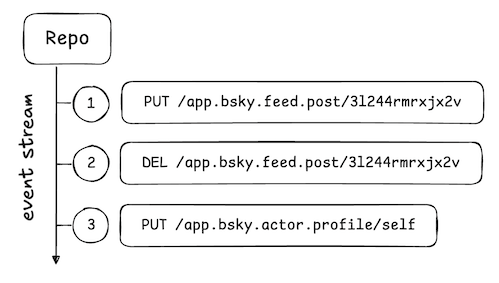
741
742Using a [~~Relay~~ Jetstream service](https://docs.bsky.app/blog/jetstream) we can listen to an
743aggregated firehose of these events across all users in the network. In our case what we're looking for are valid
744`xyz.statusphere.status` records.
745
746```rust
747/** ./src/ingester.rs **/
748#[async_trait]
749impl LexiconIngestor for StatusSphereIngester {
750 async fn ingest(&self, message: Event<Value>) -> anyhow::Result<()> {
751 if let Some(commit) = &message.commit {
752 //We manually construct the uri since jetstream does not provide it
753 //at://{users did}/{collection: xyz.statusphere.status}{records key}
754 let record_uri = format!("at://{}/{}/{}", message.did, commit.collection, commit.rkey);
755 match commit.operation {
756 Operation::Create | Operation::Update => {
757 if let Some(record) = &commit.record {
758 //We deserialize the record into our Rust struct
759 let status_at_proto_record = serde_json::from_value::<
760 lexicons::xyz::statusphere::status::RecordData,
761 >(record.clone())?;
762
763 if let Some(ref _cid) = commit.cid {
764 // Although esquema does not have full validation yet,
765 // if you get to this point,
766 // You know the data structure is the same
767
768 // Store the status
769 // TODO
770 }
771 }
772 }
773 Operation::Delete => {},
774 }
775 } else {
776 return Err(anyhow!("Message has no commit"));
777 }
778 Ok(())
779}
780}
781```
782
783Let's create a SQLite table to store these statuses:
784
785```rust
786/** ./src/db.rs **/
787// Create our statuses table
788pub async fn create_tables_in_database(pool: &Pool) -> Result<(), async_sqlite::Error> {
789 pool.conn(move |conn| {
790 conn.execute("PRAGMA foreign_keys = ON", []).unwrap();
791
792 // status
793 conn.execute(
794 "CREATE TABLE IF NOT EXISTS status (
795 uri TEXT PRIMARY KEY,
796 authorDid TEXT NOT NULL,
797 status TEXT NOT NULL,
798 createdAt INTEGER NOT NULL,
799 indexedAt INTEGER NOT NULL
800 )",
801 [],
802 )
803 .unwrap();
804
805// ...
806```
807
808Now we can write these statuses into our database as they arrive from the firehose:
809
810```rust
811/** ./src/ingester.rs **/
812// If the write is a valid status update
813if let Some(record) = &commit.record {
814 let status_at_proto_record = serde_json::from_value::<
815 lexicons::xyz::statusphere::status::RecordData,
816 >(record.clone())?;
817
818 if let Some(ref _cid) = commit.cid {
819 // Although esquema does not have full validation yet,
820 // if you get to this point,
821 // You know the data structure is the same
822 let created = status_at_proto_record.created_at.as_ref();
823 let right_now = chrono::Utc::now();
824 // We save or update the record in the db
825 StatusFromDb {
826 uri: record_uri,
827 author_did: message.did.clone(),
828 status: status_at_proto_record.status.clone(),
829 created_at: created.to_utc(),
830 indexed_at: right_now,
831 handle: None,
832 }
833 .save_or_update(&self.db_pool)
834 .await?;
835 }
836}
837```
838
839You can almost think of information flowing in a loop:
840
841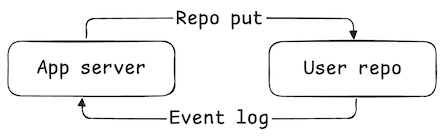
842
843Applications write to the repo. The write events are then emitted on the firehose where they're caught by the apps and
844ingested into their databases.
845
846Why sync from the event log like this? Because there are other apps in the network that will write the records we're
847interested in. By subscribing to the event log (via the Jetstream), we ensure that we catch all the data we're interested in —
848including data published by other apps!
849
850## Step 7. Listing the latest statuses
851
852Now that we have statuses populating our SQLite, we can produce a timeline of status updates by users. We also use
853a [DID](https://atproto.com/specs/did)-to-handle resolver so we can show a nice username with the statuses:
854```rust
855/** ./src/main.rs **/
856// Homepage
857/// Home
858#[get("/")]
859async fn home(
860 session: Session,
861 oauth_client: web::Data<OAuthClientType>,
862 db_pool: web::Data<Arc<Pool>>,
863 handle_resolver: web::Data<HandleResolver>,
864) -> Result<impl Responder> {
865 const TITLE: &str = "Home";
866 // Fetch data stored in our SQLite
867 let mut statuses = StatusFromDb::load_latest_statuses(&db_pool)
868 .await
869 .unwrap_or_else(|err| {
870 log::error!("Error loading statuses: {err}");
871 vec![]
872 });
873
874 // We resolve the handles to the DID. This is a bit messy atm,
875 // and there are hopes to find a cleaner way
876 // to handle resolving the DIDs and formating the handles,
877 // But it gets the job done for the purpose of this tutorial.
878 // PRs are welcomed!
879
880 //Simple way to cut down on resolve calls if we already know the handle for the did
881 let mut quick_resolve_map: HashMap<Did, String> = HashMap::new();
882 for db_status in &mut statuses {
883 let authors_did = Did::new(db_status.author_did.clone()).expect("failed to parse did");
884 //Check to see if we already resolved it to cut down on resolve requests
885 match quick_resolve_map.get(&authors_did) {
886 None => {}
887 Some(found_handle) => {
888 db_status.handle = Some(found_handle.clone());
889 continue;
890 }
891 }
892 //Attempts to resolve the DID to a handle
893 db_status.handle = match handle_resolver.resolve(&authors_did).await {
894 Ok(did_doc) => {
895 match did_doc.also_known_as {
896 None => None,
897 Some(also_known_as) => {
898 match also_known_as.is_empty() {
899 true => None,
900 false => {
901 //also_known as a list starts the array with the highest priority handle
902 let formatted_handle =
903 format!("@{}", also_known_as[0]).replace("at://", "");
904 quick_resolve_map.insert(authors_did, formatted_handle.clone());
905 Some(formatted_handle)
906 }
907 }
908 }
909 }
910 }
911 Err(err) => {
912 log::error!("Error resolving did: {err}");
913 None
914 }
915 };
916 }
917 // ...
918```
919>[!NOTE]
920> We use a newly released handle resolver from atrium.
921> Can see
922> how it is set up in [./src/main.rs](https://github.com/fatfingers23/rusty_statusphere_example_app/blob/a13ab7eb8fcba901a483468f7fd7c56b2948972d/src/main.rs#L508)
923
924
925Our HTML can now list these status records:
926
927```html
928<!-- ./templates/home.html -->
929{% for status in statuses %}
930<div class="{% if loop.first %} status-line no-line {% else %} status-line {% endif %} ">
931 <div>
932 <div class="status">{{status.status}}</div>
933 </div>
934 <div class="desc">
935 <a class="author"
936 href="https://bsky.app/profile/{{status.author_did}}">{{status.author_display_name()}}</a>
937 {% if status.is_today() %}
938 is feeling {{status.status}} today
939 {% else %}
940 was feeling {{status.status}} on {{status.created_at}}
941 {% endif %}
942 </div>
943</div>
944{% endfor %}
945`
946})}
947```
948
949
950
951## Step 8. Optimistic updates
952
953As a final optimization, let's introduce "optimistic updates."
954
955Remember the information flow loop with the repo write and the event log?
956
957
958
959Since we're updating our users' repos locally, we can short-circuit that flow to our own database:
960
961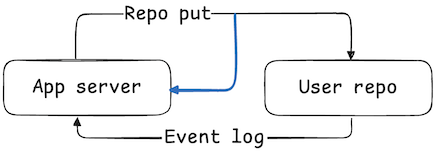
962
963This is an important optimization to make, because it ensures that the user sees their own changes while using your app.
964When the event eventually arrives from the firehose, we just discard it since we already have it saved locally.
965
966To do this, we just update `POST /status` to include an additional write to our SQLite DB:
967
968```rust
969/** ./src/main.rs **/
970/// Creates a new status
971#[post("/status")]
972async fn status(
973 request: HttpRequest,
974 session: Session,
975 oauth_client: web::Data<OAuthClientType>,
976 db_pool: web::Data<Arc<Pool>>,
977 form: web::Form<StatusForm>,
978) -> HttpResponse {
979 //...
980 let create_result = agent
981 .api
982 .com
983 .atproto
984 .repo
985 .create_record(
986 atrium_api::com::atproto::repo::create_record::InputData {
987 collection: Status::NSID.parse().unwrap(),
988 repo: did.into(),
989 rkey: None,
990 record: status.into(),
991 swap_commit: None,
992 validate: None,
993 }
994 .into(),
995 )
996 .await;
997
998 match create_result {
999 Ok(record) => {
1000 let status = StatusFromDb::new(
1001 record.uri.clone(),
1002 did_string,
1003 form.status.clone(),
1004 );
1005
1006 let _ = status.save(db_pool).await;
1007 Redirect::to("/")
1008 .see_other()
1009 .respond_to(&request)
1010 .map_into_boxed_body()
1011 }
1012 Err(err) => {
1013 log::error!("Error creating status: {err}");
1014 let error_html = ErrorTemplate {
1015 title: "Error",
1016 error: "Was an error creating the status, please check the logs.",
1017 }
1018 .render()
1019 .expect("template should be valid");
1020 HttpResponse::Ok().body(error_html)
1021 }
1022 }
1023 //...
1024}
1025```
1026
1027You'll notice this code looks almost exactly like what we're doing in `ingester.rs`.
1028
1029## Thinking in AT Proto
1030
1031In this tutorial we've covered the key steps to building an atproto app. Data is published in its canonical form on
1032users' `at://` repos and then aggregated into apps' databases to produce views of the network.
1033
1034When building your app, think in these four key steps:
1035
1036- Design the [Lexicon](#) schemas for the records you'll publish into the Atmosphere.
1037- Create a database for aggregating the records into useful views.
1038- Build your application to write the records on your users' repos.
1039- Listen to the firehose to aggregate data across the network.
1040
1041Remember this flow of information throughout:
1042
1043
1044
1045This is how every app in the Atmosphere works, including the [Bluesky social app](https://bsky.app).
1046
1047## Next steps
1048
1049If you want to practice what you've learned, here are some additional challenges you could try:
1050
1051- Sync the profile records of all users so that you can show their display names instead of their handles.
1052- Count the number of each status used and display the total counts.
1053- Fetch the authed user's `app.bsky.graph.follow` follows and show statuses from them.
1054- Create a different kind of schema, like a way to post links to websites and rate them 1 through 4 stars.
1055
1056[Ready to learn more? Specs, guides, and SDKs can be found here.](https://atproto.com/)
1057
1058>[!NOTE]
1059> Thank you for checking out my version of the Statusphere example project!
1060> There are parts of this I feel can be improved on and made more efficient,
1061> but I think it does a good job for providing you with a starting point to start building Rust applications in the Atmosphere.
1062> See something you think could be done better? Then please submit a PR!
1063> [@baileytownsend.dev](https://bsky.app/profile/baileytownsend.dev)