slide deck presentation tool written in pure bash
 anirudh.fi
1# shlide
2> a slide deck presentation tool written in pure bash
3
4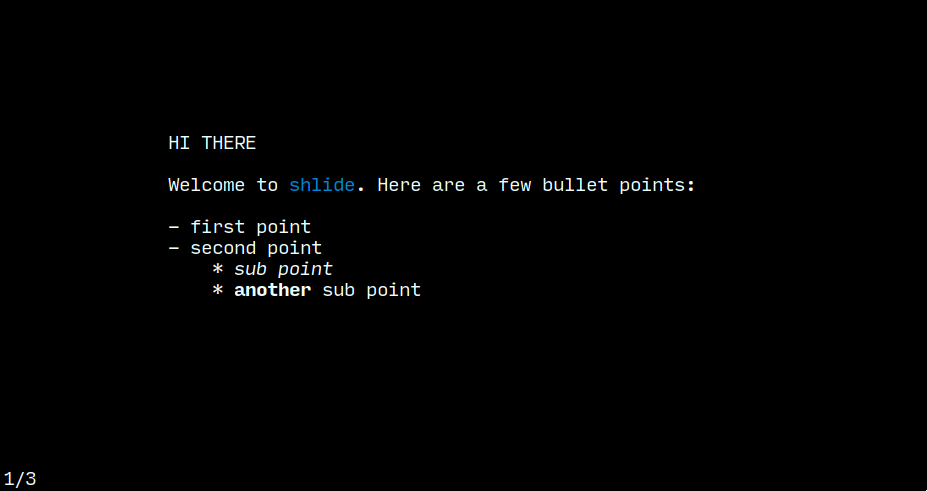
5
6## Features
7
8- All slides are plain-text files.
9- Vim like navigation.
10- Text color and style formatting.
11- Pure bash.
12
13## Requirements
14
15- `bash 4+`
16
17## Usage
18
19Create a directory for your slides. Name each slide starting with
20a number and a hyphen, like so:
21
22```shell
23$ mkdir deck
24$ touch deck/1-first-slide.txt
25$ touch deck/2-another.txt
26
27# so on
28```
29
30**Note**: Make sure to prefix the first 9 slides with a `0` (`01-foo.txt`, `02-bar.txt` ...),
31if you have more than 10 slides.
32
33Finally, run:
34
35```shell
36$ shlide deck/
37```
38
39## Controls
40
41- Next slide: `j`, `n`, `;`, `space`, `enter`
42- Previous slide: `k`, `p`, `,`, `backspace`
43- Jump to first slide: `0`
44- Jump to last slide: `G`
45- Reload: `r`
46- Quit: `q`
47
48## Formatting
49
50Slide content can be formatted like so:
51
52```txt
53Welcome to ${GRN}shlide${RST}. ${STR}Here${RST} are a few bullet points:
54
55- first point
56- second point
57 * ${ITA}sub point${RST}
58 * ${BLD}another${RST} sub point
59```
60
61**Note**: Make sure to `${RST}` (reset) at the end.
62
63A full list of formatting options are below:
64
65### Colors
66
67|Key|Effect |
68|-|-|
69| `BLK` | black |
70| `RED` | red |
71| `GRN` | green |
72| `YLW` | yellow |
73| `BLU` | blue |
74| `PUR` | purple |
75| `CYN` | cyan |
76| `RST` | reset |
77
78### Styles
79
80|Key|Effect |
81|-|-|
82| `BLD` | bold |
83| `DIM` | dim |
84| `ITA` | italics |
85| `UND` | underline |
86| `FLS` | flashing |
87| `REV` | reverse |
88| `INV` | invert |
89| `STR` | strikethrough |
90